Quick answer
Limits are monthly amounts in your plan, such as imports or research runs, and they reset on the 1st. Credits pay only for live Google lookups that find results, such as Rank Tracker Check now or Lead Finder Maps searches. Plan credits refill monthly; credit packs never expire.
AM Jarvis has two kinds of allowance, and knowing the difference saves you money. Limits are monthly amounts included in your plan, such as imports, research runs, site pages or social posts. Credits pay for live Google lookups that cost money every time they run, such as a rank check on demand or a Google Maps search in Lead Finder. This guide explains both, shows where to see them and lists what uses credits in each tool.
The numbers come from the plans in the app today. Your own numbers are always on the Plan and Billing page.
1 See your credits and limits in Plan and Billing
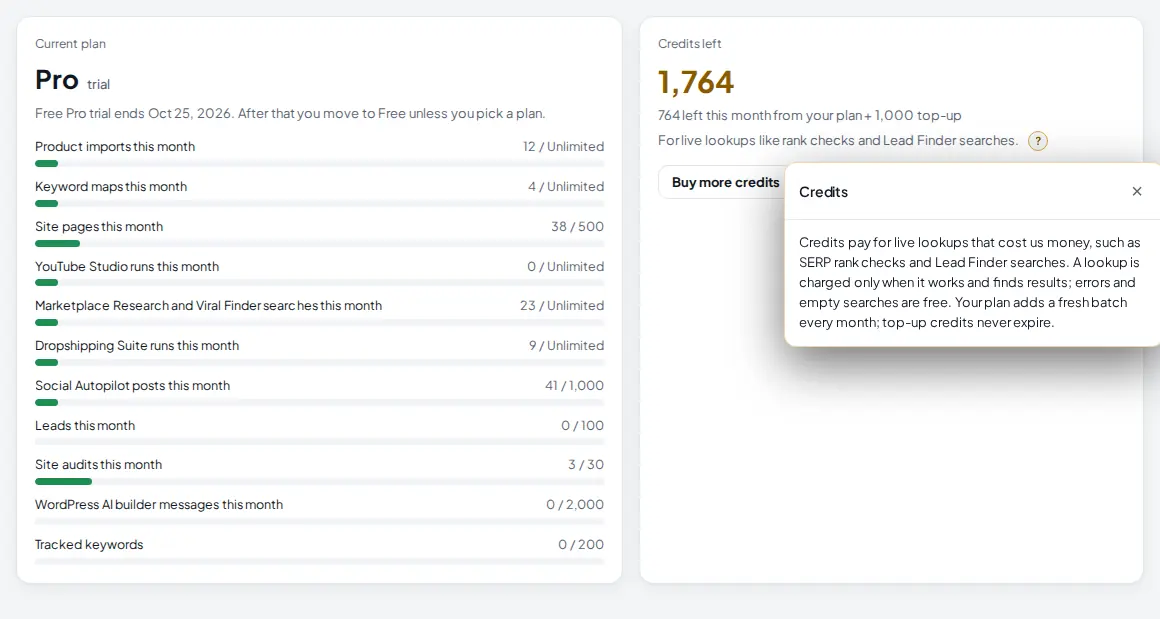
Click Plan & Billing in the Account section of the left menu. The two cards at the top show everything you have used this month.
 1
2
3
4
1
2
3
4
- Credits left. Everything you can still spend: this month's plan credits plus any credits you bought.
- The split. For example "764 left this month from your plan + 1,000 top-up". Plan credits are always spent first, then bought credits.
- Usage bars. One bar per monthly limit, with what you used and your plan's limit. "Unlimited" means your plan has no cap for it.
- Buy more credits. Jumps to the credit packs further down the page.
The same numbers are on your home screen under This month's usage.
 1
1
- This month's usage. Click Show to open it and Hide to fold it. The last line is your credits left, and the link at the bottom opens Plan and Billing.
2 Know the monthly limits of your plan
Limits count by calendar month (UTC) and start again from zero on the 1st of every month. Here are the main ones:
| Limit | Free | Starter | Pro | Agency |
|---|---|---|---|---|
| Store domains | 1 | 1 | 3 | 10 |
| Product imports a month | 10 | 1,000 | Unlimited | Unlimited |
| Bulk Edit products per task | 50 | 5,000 | Unlimited | Unlimited |
| Keyword maps a month | 3 | 10 | Unlimited | Unlimited |
| Site pages a month | 5 a build | 50 | 500 | Unlimited |
| Marketplace Research and Viral Finder searches | 5 | 100 | Unlimited | Unlimited |
| Dropshipping Suite runs | 5 | 100 | Unlimited | Unlimited |
| YouTube Studio runs | 5 | 100 | Unlimited | Unlimited |
| Social Autopilot posts | 10 | 150 | 1,000 | Unlimited |
| SEO site audits (pages each) | 2 (50) | 10 (200) | 30 (500) | 200 (2,000) |
| Tracked rank keywords | 5, weekly | 30, daily | 200, daily | 1,000, daily |
| Leads a month (Lead Finder Pro) | No | No | 100 | 1,000 |
| WordPress sites and AI builder messages | 1 site, 30 | 3 sites, 300 | 10 sites, 2,000 | 100 sites, unlimited |
| Credits included each month | 50 | 300 | 1,000 | 3,000 |
Tracked keywords, store domains and WordPress sites are not monthly: they count what you have at any moment. During a Pro trial you get the Pro numbers.
3 Know what uses credits
Credits are only spent on live lookups, mostly Google searches. The rule is the same everywhere: a lookup costs credits only when it works and finds results. Errors and empty searches are free. Tools that can use several credits show the most they will use before you start.
| Tool | What uses credits | What is free |
|---|---|---|
| Rank Tracker | "Check now" on a keyword: 1 credit per keyword. | The automatic daily (or weekly on Free) checks. |
| Lead Finder | 1 credit for each Google Maps page of about 10 listings that comes back with results. A Google rankings check uses up to 3 credits. | Website checks, scores, outreach templates and the pipeline. |
| Marketplace Research | Amazon via Google: up to 2 credits. Temu, AliExpress and others via Google Shopping: up to 1 credit. | Etsy and eBay lookups. Each search still counts as 1 research run. |
| Viral Finder | 1 credit per Google search that returns results, with a cap per run. | Searches that find nothing. |
| Niche Research and the niche finder | 1 credit per Google search for questions or results groups. The niche finder shows its maximum first: up to 40 credits for Quick, up to 60 for Full. | Searches that find nothing. |
| Dropshipping Suite | Product Finder: up to 3 credits. Search a product and Google Shopping sellers: 1 credit each. The cost is printed on each tool's card. | Store Spy and the Facebook, Instagram and TikTok ad finders (each uses 1 research run), and the Products, Orders, Profit and Sync log tabs. |
| YouTube Studio | Without the YouTube Data API key, competition checks use Google video results: 1 credit per search. | Checks through the YouTube Data API. |
| WordPress articles | 1 credit for a Google search for questions and top results while an article is written. | If you have no credits, the article is written without it. |
Never paid with credits: AI writing (it runs on your own AI key from Settings, so you pay your AI company directly with zero markup), imports, Bulk Edit, site audits, social posts and the automatic rank checks. Those count toward their monthly limits instead.
Tip: Google lookups run through a search key that the admin adds to the platform. If a tool says Google search is not switched on yet, that is the reason, and nothing is charged.
4 Understand monthly resets and refunds
- Monthly credits reset. On the 1st of each month (UTC) your plan's credits are refilled to the full amount. Unused plan credits from last month do not carry over.
- Bought credits never expire. They stay until you use them and are only spent after your plan credits for the month are gone.
- Failed runs are refunded. If a check fails, or a background run stops (for example because the server restarted), the credits it took are given back once. Plan credits from an earlier month come back as bought credits, so you never lose them to the reset.
- Checked before you start. A run that needs more credits than you have is stopped before it starts, so it never stops halfway.
5 Buy a credit pack
Scroll to Credit packs on the Plan and Billing page, or click Buy more credits. Packs are one time top-ups that never expire.
 1
2
3
1
2
3
- 1,000 credits for $10 (Rs 1,999 in PKR).
- 5,000 credits for $40 (Rs 7,999), the better price per credit.
- Checkout. PayPal or card in USD. The credits are added as soon as the payment goes through. In PKR you pay by transfer, add the transaction ID and a screenshot, and the credits are added when the payment is approved.
6 What happens when you reach a limit
When an action would go over a monthly limit, or needs more credits than you have, the tool does not run and a window explains why.
 1
2
1
2
- The message. Which limit you reached, how much you used and which plan gives you more. For credits it says how many the action needs and how many you have left.
- See plans. Opens Plan and Billing. Upgrade, buy a credit pack, or wait for the 1st of the month.
Tools that your plan does not include at all (for example Programmatic SEO before Agency) show a lock in the menu and an upgrade screen when you open them.
Tips
- Let the Rank Tracker check on its own schedule. It is free, and "Check now" is only worth it right after you change a page.
- Before a big niche or lead search, read the credit estimate the tool shows and lower the depth if you are near the end of your credits.
- Buy the 5,000 pack only if you run Lead Finder or the niche finder often. Most stores never use all of their plan credits.
- If you keep hitting a monthly limit early in the month, the next plan is usually cheaper than working around it.
Common mistakes
- Thinking AI writing uses credits. It does not. It uses your own AI key, and an empty key is why AI buttons ask you to connect one.
- Saving plan credits for next month. They do not roll over. Only bought credits stay.
- Removing a store to free a slot. Store domains stay counted after removal.
- Worrying about failed checks. A check that fails or finds nothing is free or refunded.
What to do next
See how credits work in practice in Track your Google positions and the map pack, or go back to Create your account and pick a plan to change your plan. Full plan details are on the pricing page.
Frequently asked questions
Do unused credits roll over to next month?
Plan credits do not: they refill to your plan's amount on the 1st of each month. Credits you buy in a pack never expire.
Does AI writing use credits?
No. AI writing runs on your own AI key from Settings, so you pay your AI company directly with no markup.
Am I charged when a search finds nothing?
No. A lookup costs credits only when it works and returns results. Failed checks and interrupted runs are refunded.
Which are spent first, plan credits or bought credits?
Plan credits for the month are spent first. Bought credits are used only after those run out.
What is a research run?
A research run is one search in Marketplace Research, Viral Finder or the Dropshipping Suite. Marketplace Research and Viral Finder share one monthly limit and the Dropshipping Suite has its own: 5 a month on Free, 100 on Starter and unlimited on Pro and Agency. Runs are counted separately from credits.

Founder of AM Jarvis. More than a decade running e-commerce stores, Google Shopping campaigns and niche sites. About the author
The app changes often. If a screen here no longer matches what you see, let us know and we will update the guide.