Quick answer
The outlier finder lists recent videos in your niche with their views divided by their channel's median views, so you see which ideas worked beyond the channel's size, and what the top ones have in common. The keyword explorer mines real YouTube search suggestions and reads the top 20 results to give each keyword an opportunity score.
This guide is for creators who want video ideas that are proven to work and titles people search for. An outlier is a video that got many times its channel's usual views. That usually means the idea or the packaging worked, not just the channel size.
Each outlier search and each keyword search counts 1 YouTube Studio run (Free 5 a month, Starter 100, Pro and Agency no cap). The outlier finder needs the YouTube Data API key, which the admin adds once in Admin > Platform settings; the keyword explorer uses Google video results with reduced accuracy when it is off.
1 Search for outliers
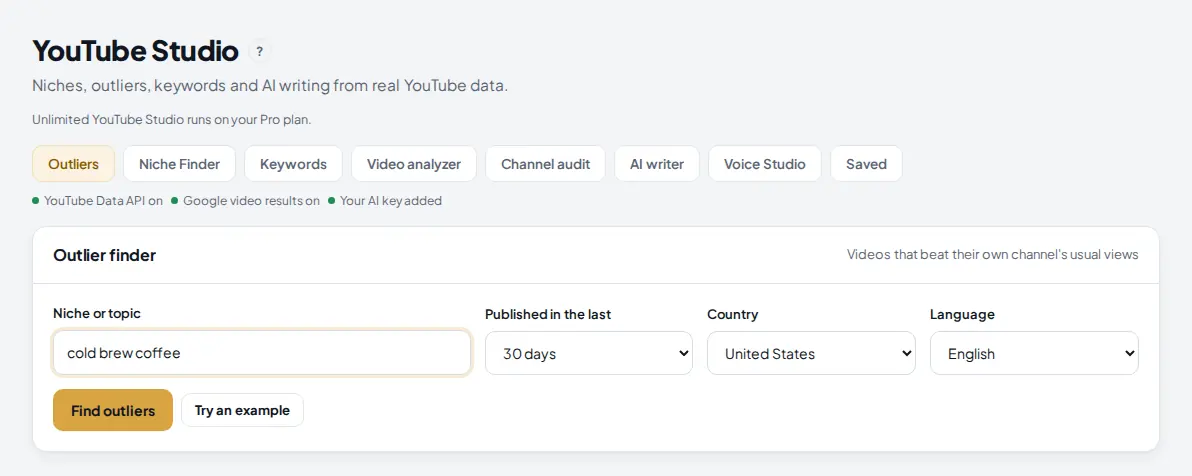
Open YouTube Studio under Grow in the menu and click Outliers. Type your niche or topic, for example cold brew coffee, pick how recent the videos should be and the country and language, and press Find outliers.
 1
2
3
4
5
1
2
3
4
5
- Outliers tab. The others are Niche Finder, Keywords, Video analyzer, Channel audit, AI writer, Voice Studio and Saved.
- Niche or topic.
- Published in the last 7, 30 or 90 days.
- Country and language of the search.
- Find outliers: 1 YouTube Studio run. It runs in the background, so you can wait on the page.
2 See what the top outliers have in common
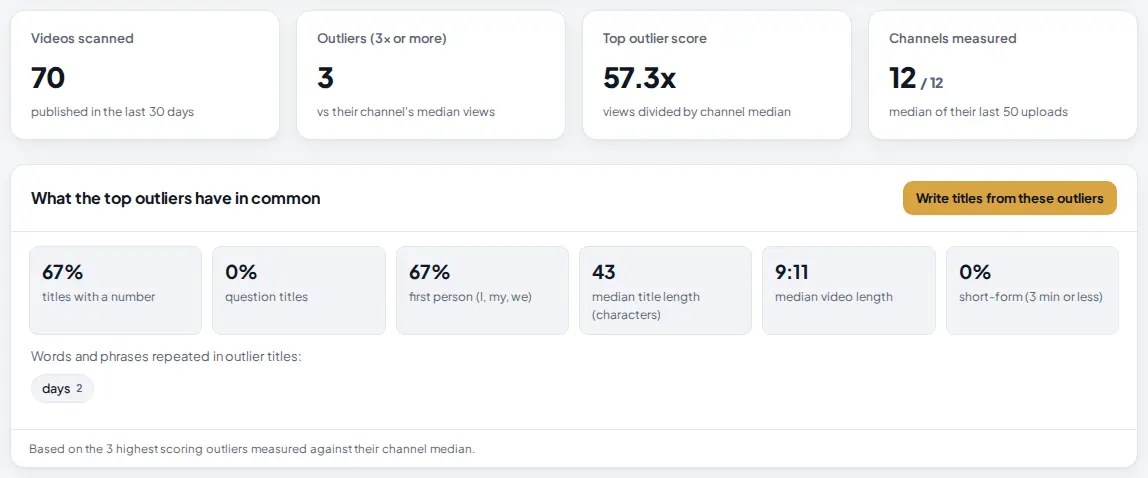
The result opens with four totals and a short analysis of the highest scoring outliers: how many titles have a number or are a question, how many are in first person, the median title and video length, and the words they repeat.
 1
2
3
4
1
2
3
4
- Outliers (3x or more): videos with at least three times their channel's median views.
- Top outlier score: the best video's views divided by its channel's median.
- Patterns: what the titles and videos that worked share.
- Write titles from these outliers sends the outlier titles to the AI writer, so it writes titles in the same style for your topic.
3 Browse and filter the outliers
 1
2
3
4
5
6
1
2
3
4
5
6
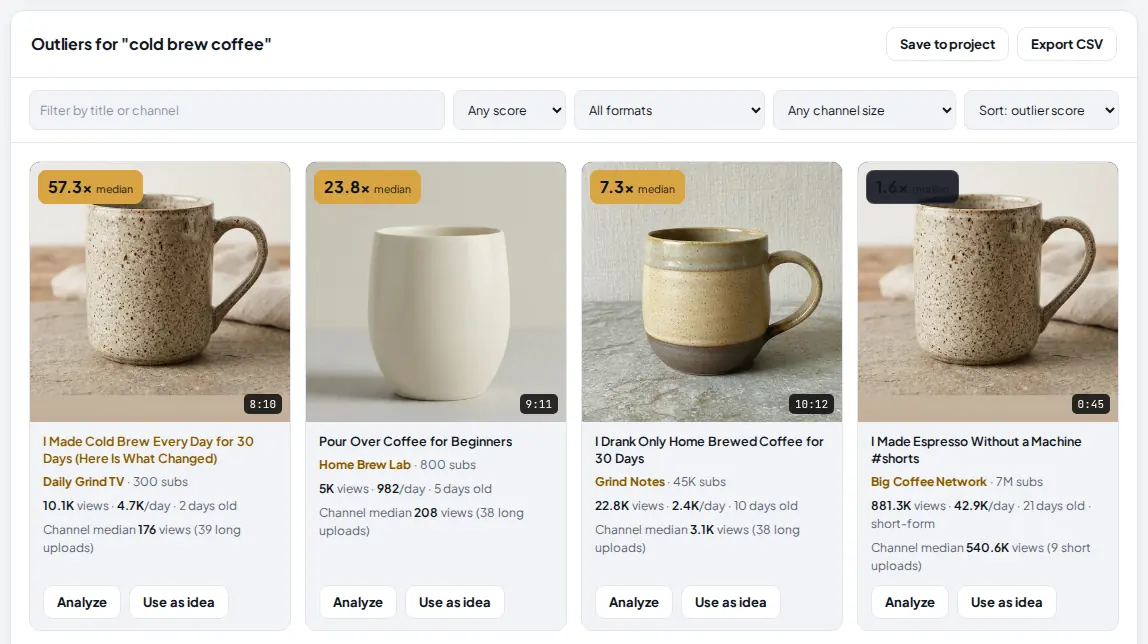
- Score filter: 2x, 3x, 5x or 10x or more. Next to it, a format filter for long videos or short-form.
- Channel size: under 10K, 100K or 1M subscribers. Small channels with big outliers are the best proof an idea works.
- The score: gold for 3x and more. "median" means it was measured against the channel's median; "per sub" means views per subscriber was used instead.
- Channel median: the channel's usual views, from its recent uploads in the same format.
- Use as idea sends the title to the AI writer as a topic. Analyze opens the Video analyzer and runs it on that video (1 run).
- Export CSV downloads the list. Save to project keeps it in Saved.
The outlier score is the video's views divided by the channel's median views, from the channel's last 50 uploads that are at least 3 days old, in the same format when there are enough. 10x means ten times what that channel usually gets. Open "How the outlier score works" under the grid for the details.
4 Search for keywords
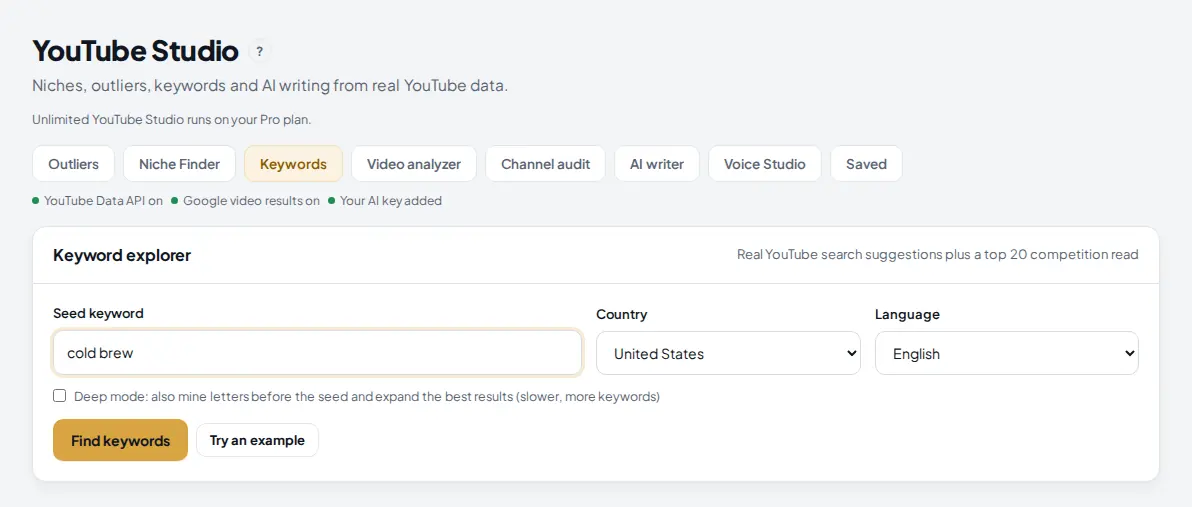
Click Keywords. Type a seed keyword, for example cold brew, and press Find keywords. Jarvis mines YouTube's own search suggestions for the seed and reads the top 20 videos for the seed itself.
 1
2
3
4
1
2
3
4
- Keywords tab.
- Seed keyword: 2 to 80 characters.
- Deep mode also mines letters before the seed and expands the best results: slower, more keywords.
- Find keywords: 1 YouTube Studio run.
5 Read the competition for your seed
 1
2
3
4
5
1
2
3
4
5
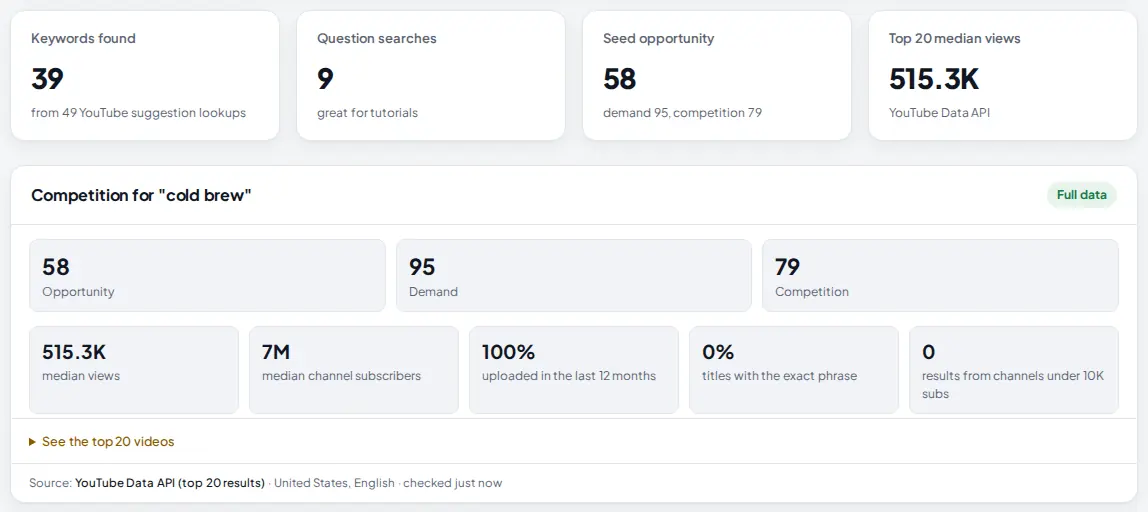
- Keywords found from YouTube suggestion lookups. Question searches are good for tutorials.
- Seed opportunity: 50% demand plus 50% (100 minus competition). Higher is better.
- Opportunity, demand and competition for the seed, from the top 20 videos.
- The top 20 read: median views, median channel size, how fresh the results are, how many titles use the exact phrase, and how many come from small channels.
- See the top 20 videos lists them with views, subscribers and age.
Full data means it came from the YouTube Data API. "Reduced accuracy" means Google video results were used and subscriber counts were not available.
6 Check the keywords you like and pick the best
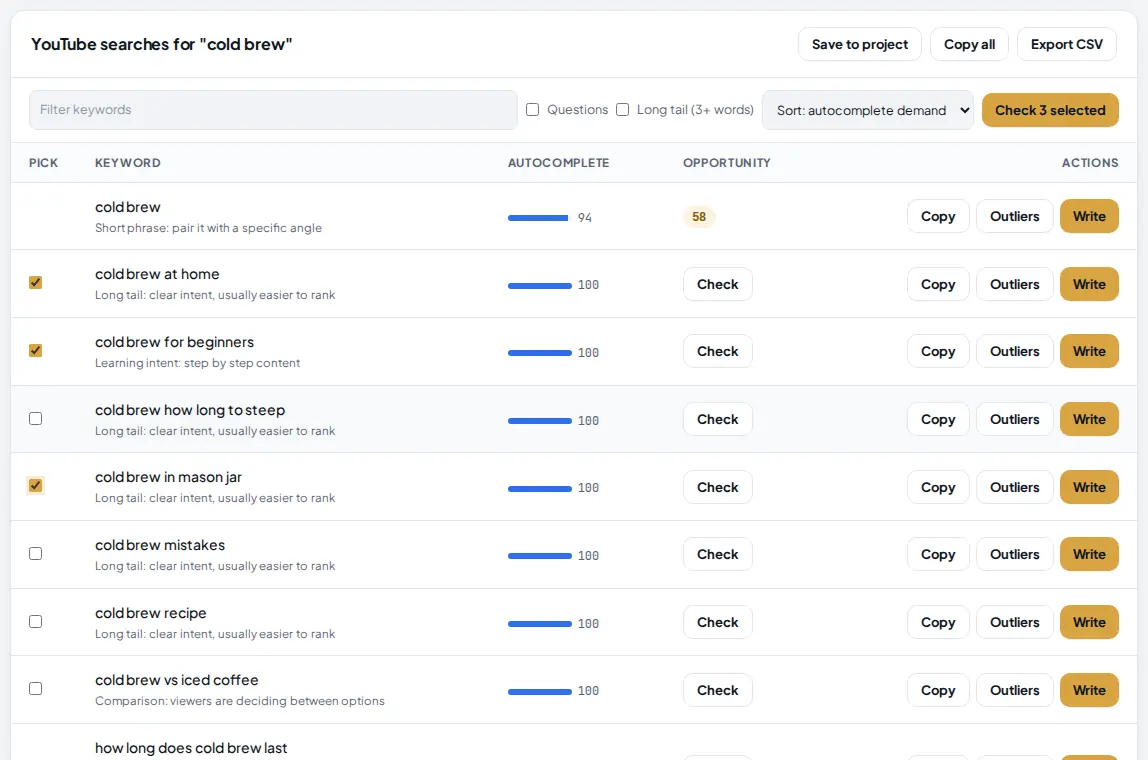
The table lists every suggestion with how strongly YouTube suggests it. Tick up to 5 keywords and press Check selected to read their top 20 too, or press Check on one row.
 1
2
3
4
5
1
2
3
4
5
- Pick: tick up to 5 keywords.
- Check 3 selected reads the top 20 for each. Each check counts 1 run; a keyword checked in the last 24 hours is free.
- Sort by autocomplete demand, opportunity, A to Z or longest first.
- Outliers copies the keyword to the outlier finder.
- Write sends it to the AI writer for titles, a description, tags and chapters (your AI key).
 1
2
1
2
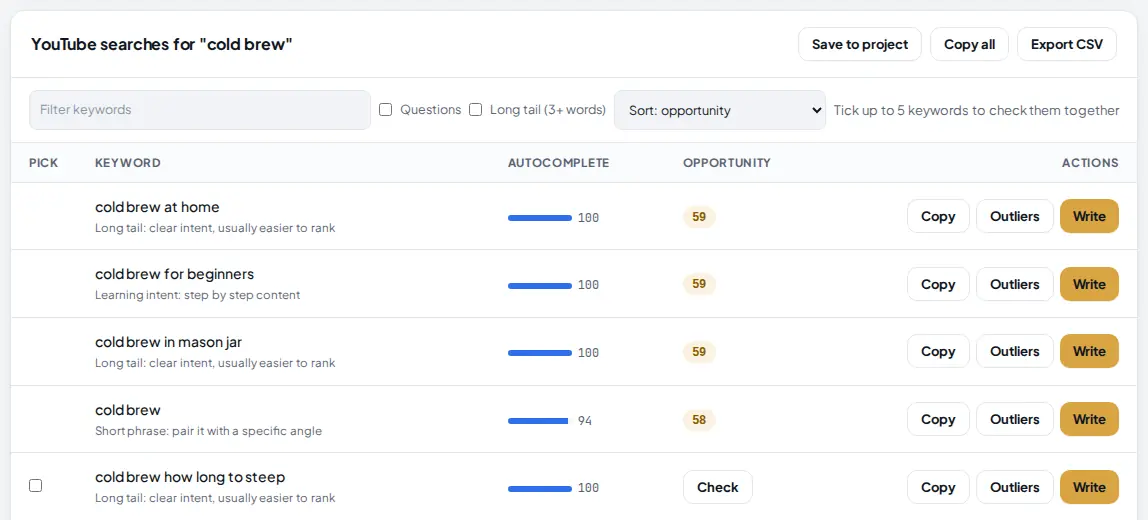
- Opportunity for each checked keyword.
- Sort: opportunity puts the best on top.
Copy all and Export CSV are at the top of the table, and Save to project keeps the list in Saved.
Tips
- Filter outliers to channels under 100K subscribers. A small channel with a 20x video found an idea, not an audience.
- Read the patterns card before you write a title. If most outlier titles have a number and first person, try that.
- Use the Questions filter in the keyword table for tutorial ideas.
- Pick keywords with a decent opportunity where small channels already appear in the top 20.
- Send outliers to the AI writer with Write titles from these outliers, then edit the best title yourself.
Common mistakes
- Chasing total views. A 1M view video on a 5M subscriber channel is normal. The outlier score shows what beat expectations.
- Copying a title. Use the idea and the pattern, then make the title your own and true to your video.
- Reading autocomplete as search volume. It is how high and how often YouTube suggests the phrase, a relative signal. YouTube does not publish search volume.
- Checking 30 keywords one by one. Tick up to 5 and check them together; keywords checked in the last 24 hours are free.
What to do next
Find a faceless niche first with the Niche Finder tab, or see what is trending this week with the Viral Finder. More on the YouTube Studio page.
Frequently asked questions
What is an outlier score?
The video's views divided by its channel's median views, from the channel's last 50 uploads that are at least 3 days old, in the same format when there are enough. 10x means ten times what that channel usually gets. When the uploads cannot be measured, views per subscriber is used and labeled "per sub".
What does it cost?
Each outlier search and each keyword search counts 1 YouTube Studio run. Each keyword check counts 1 run too, unless that keyword was checked in the last 24 hours. Free has 5 runs a month, Starter 100, Pro and Agency no cap.
Why does a keyword say reduced accuracy?
Without the YouTube Data API key, Jarvis reads Google video results instead. They have no subscriber counts, so competition uses view counts, freshness and title match only.
Does YouTube Studio show search volume?
No. YouTube does not publish it. Demand comes from how YouTube suggests the phrase and the views of the top 20 videos, and it is labeled that way.

Founder of AM Jarvis. More than a decade running e-commerce stores, Google Shopping campaigns and niche sites. About the author
The app changes often. If a screen here no longer matches what you see, let us know and we will update the guide.