Quick answer
You score a niche on 8 factors, build a dataset with one row per product, city or comparison, choose a page pattern and click Build programmatic site. AM Jarvis writes one page per record from that record's own data, compares every page with its siblings and marks near-duplicates noindex, then gives you a site to download or publish.
Programmatic SEO is for niches where people search the same kind of question with a different variable each time: "[product] review", "[service] in [city]", "[a] vs [b]", "best [item] for [use]". Instead of writing each page by hand, you build a dataset with one row per variable and AM Jarvis writes one page per row. It is part of the Agency plan, and it needs an AI key in Settings (or the platform key set by the admin).
The page works in three cards: score the niche, build the dataset, then set the template and build. This guide uses "aquarium air pumps" with one review page per pump model.
1 Score the niche
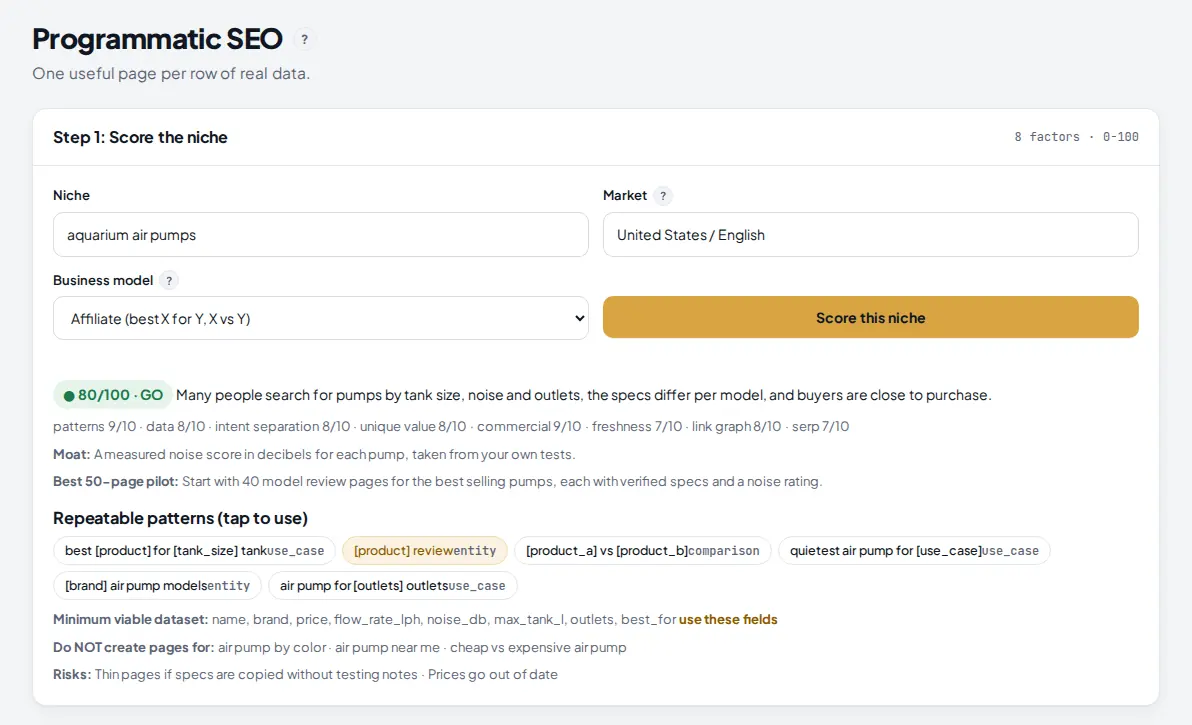
Open Programmatic SEO in the Build menu. In Step 1: Score the niche, type the niche, check the market and pick the business model, then click Score this niche. The AI rates it on 8 factors and suggests page patterns that are worth building.
 1
2
3
4
1
2
3
4
- Niche: the topic. Market next to it is the country and language, United States / English by default.
- Business model: affiliate, lead gen (service in location), tools or calculators, directory, ecommerce facets, or ads. It changes which patterns are suggested.
- The score and verdict: 80 and up is GO, 70 to 79 PILOT, 60 to 69 only with a moat, below 60 REDESIGN. Under it are the 8 factor scores, the moat (what would make your pages hard to copy) and the best 50 page pilot.
- Repeatable patterns: click one to copy it into the page pattern and set the matching page family in step 2. Below them: the minimum dataset fields (with "use these fields"), what not to build pages for, and the risks.
Read the "Do NOT create pages for" line. Pages whose answer would not change with the variable, or that nobody searches for, are what gets programmatic sites into trouble.
2 Build the dataset
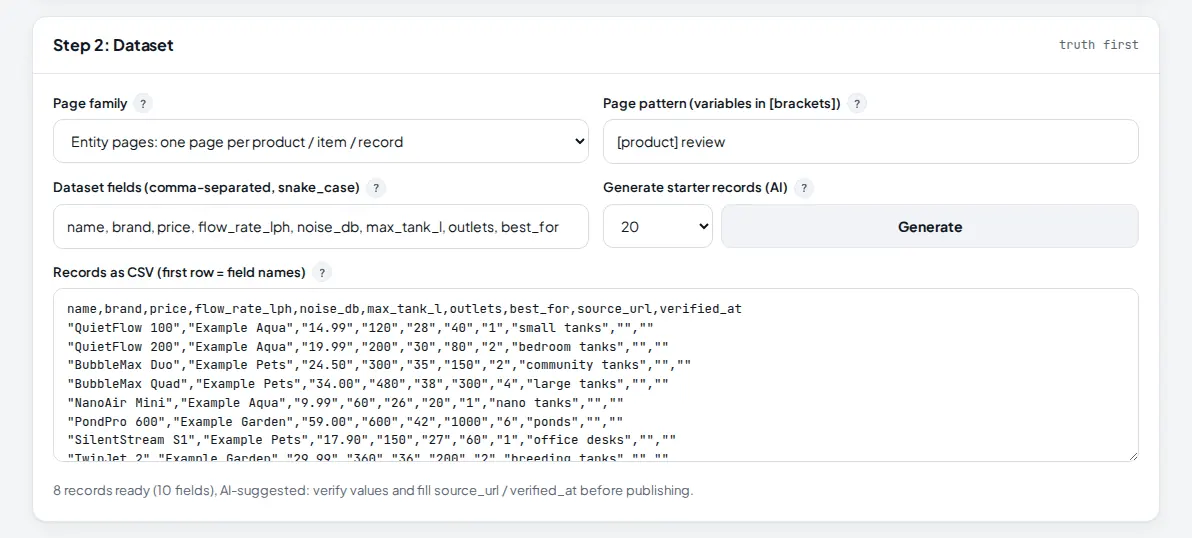
In Step 2: Dataset you define one row per page. You can paste your own CSV, or let the AI suggest starter records and then fix them.
 1
2
3
4
5
1
2
3
4
5
- Page family: entity (one page per product or item), service × location (one per city or area), comparisons (one per A vs B pair) or best for (one per use case).
- Page pattern: the search the pages answer, with variables in brackets.
- Dataset fields: comma separated, snake_case. "Use these fields" in step 1 fills them for you.
- Generate writes 10, 20, 30 or 40 starter records into the CSV box. source_url and verified_at columns are added empty for you to fill.
- How many records and fields are ready, with the reminder to verify AI values before you publish.
The first row of the CSV is the field names. Each family looks for a field that names the page:
| Page family | Field that names each page | Example row |
|---|---|---|
| Entity | name (or title, or model) | QuietFlow 200, Example Aqua, 19.99, ... |
| Service × location | city (or location, or area) | Austin, TX, 3 licensed plumbers, ... |
| Comparisons | a and b | QuietFlow 200, BubbleMax Duo, ... |
| Best for | use_case (or for) | bedroom tanks, ... |
Tip: real numbers make pages unique. A field like noise_db or price that differs on every row gives each page something its siblings do not have.
3 Set the template and build
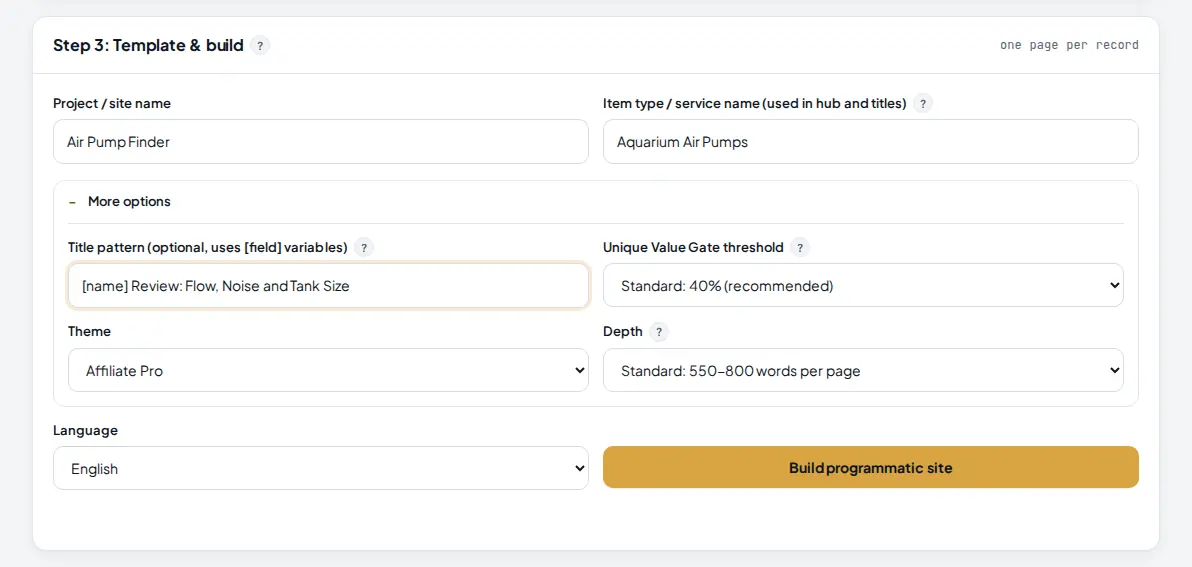
In Step 3: Template & build, name the project and the item type, open More options if you want to set the title pattern, the gate, theme and depth, then click Build programmatic site.
 1
2
3
4
5
1
2
3
4
5
- Project / site name and, next to it, the item type or service name used in the hub page and titles.
- Title pattern (optional): uses your field names in brackets, for example "[name] Review: Flow, Noise and Tank Size".
- Unique Value Gate threshold: Strict 30%, Standard 40% (recommended) or Relaxed 50% shared wording before a page is set to noindex.
- Depth: Standard is 550 to 800 words a page, Deep 900 to 1,200. The theme can be Affiliate Pro, Tools / App, Reader (AdSense) or Classic.
- Build programmatic site needs at least 3 records.
For each record, the data table is shown exactly as in your CSV, and the AI writes only the sections that are specific to that record. Sibling pages are linked to each other and to a hub page automatically.
4 Follow the build and read the gate result
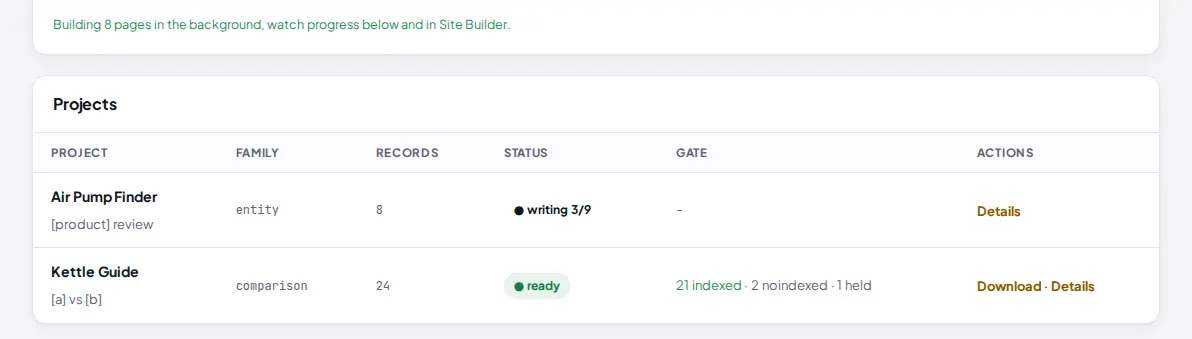
The build runs in the background. The Projects table shows each project's family, record count, status and gate result, and refreshes every few seconds while it builds.
 1
2
3
4
1
2
3
4
- The confirmation that the build started, with the number of pages.
- Progress while writing, for example 3 of 9 (8 records plus the hub page).
- Gate: how many pages are indexed, noindexed (too close to a sibling) and held (record missing its name or with too many empty fields).
- Download gets the site as a zip; Details shows the fields and the gate result for every page.
The download includes every page, the segmented sitemap with indexable pages only, dataset.csv and VALUE-GATE-REPORT.txt, which lists each page with its similarity score. Finished sites also appear in the Site Builder table and in Publish Sites.
5 Improve weak records and build again
Open VALUE-GATE-REPORT.txt and look at the noindexed pages. Each one names the sibling it is too close to. Add what makes that record different (a measured number, a use case, a pro or con from your own testing), fill any empty fields of held records, paste the new CSV in step 2 and build again. Noindexed pages stay published and linked, so visitors can still reach them while you improve them.
Tips
- Start with the 50 page pilot the score suggests. Watch how those pages do before you build hundreds.
- Keep source_url and verified_at filled. They remind you where each number came from and when you last checked it.
- Prefer Strict (30%) for thin data and Standard for rich data.
- Location pages need something local on every row, such as the number of providers or local prices, not just the city name.
Common mistakes
- Publishing AI starter records as facts. They are suggestions. Verify every value first.
- A dataset without the naming field. Rows without name (or city, a and b, use_case for the other families) are held and not built.
- Patterns nobody searches. "Air pump by color" makes pages with no readers. Use the avoid list.
- Fewer than 3 records. The build will not start.
What to do next
Need a classic topic site instead? See Build a complete niche site from one topic. More on the Programmatic SEO page.
Frequently asked questions
Which plan includes Programmatic SEO?
The Agency plan, with no monthly limit on projects. On other plans the page shows an upgrade message when you try to use it.
How many records can one project have?
At least 3 and up to 500. Each record becomes one page, plus a hub page that lists them all.
What is the Unique Value Gate?
After writing, every page is compared with its sibling pages. If a page shares more of its wording with a sibling than the threshold you chose (30%, 40% or 50%), it is published as noindex,follow and left out of the sitemap. You can enrich that record and build again. Records missing their name, or with too many empty fields, are held and not generated at all.
Can I trust the AI starter records?
Treat them as a draft. The Generate button suggests realistic rows so you can see the shape of the dataset, but every value must be checked against a real source before you publish. Fill in source_url and verified_at for each row as you check it.
Where do I download the finished site?
In the Projects table, a ready project has a Download link. The same site also appears in the Site Builder table and in Publish Sites, so you can upload it to your hosting in one click.

Founder of AM Jarvis. More than a decade running e-commerce stores, Google Shopping campaigns and niche sites. About the author
The app changes often. If a screen here no longer matches what you see, let us know and we will update the guide.