Quick answer
You type a broad topic like "home coffee" and the Winning Niche Finder returns 20 to 40 narrower niches, each scored 0 to 100 from demand, how weak the Google top 10 is, money (CPC, an AdSense RPM estimate and store results) and trend, with the reasons shown. Plan this site starts a site plan from the niche you pick.
This guide is for you if you want to build a site but do not know which niche to pick. Instead of guessing, you compare real signals for each idea and see why it scored what it did.
It lives in Niche Research. Each Google search for competition costs 1 credit, only when Google returns results, with a cap per run (Quick at most 40, Full at most 60), and searches from the last 7 days are free. Autocomplete is free. Your AI key adds more varied ideas and a suggested purpose; without it ideas come from Google autocomplete only. Competition needs the Serper key, and demand in real searches and trends need Google Ads; the admin adds them in Admin > Platform keys.
1 Type a broad topic
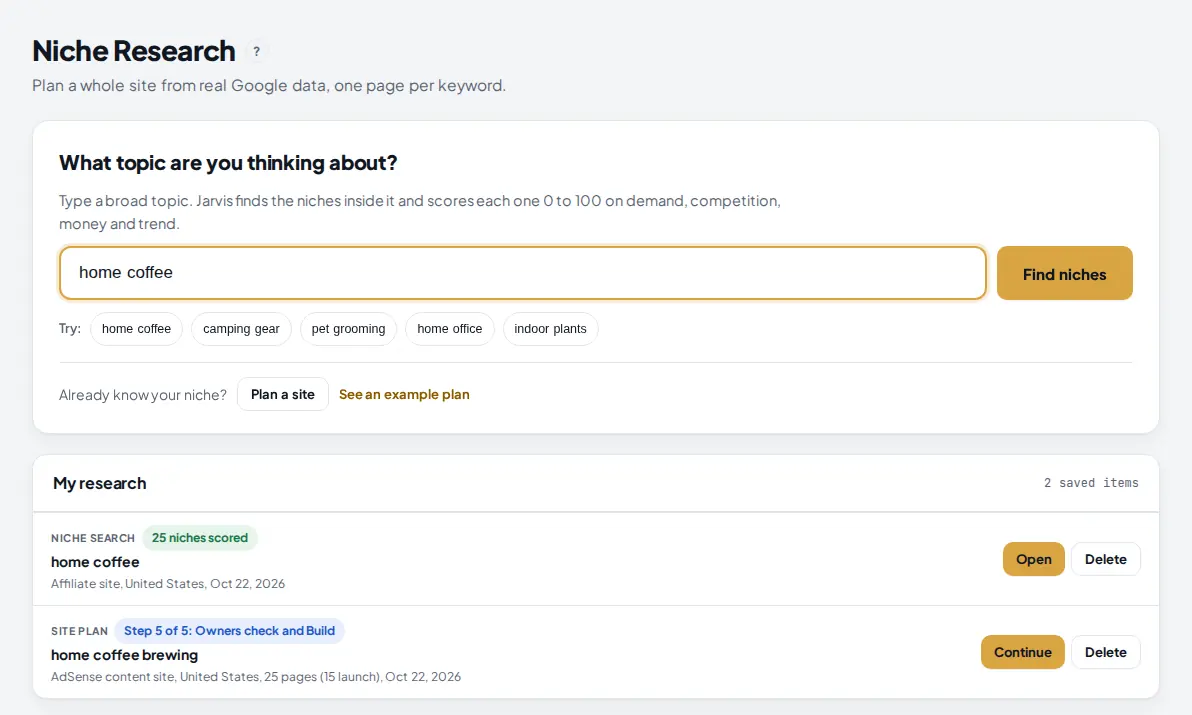
Open Niche Research in the menu. In the box at the top, type a broad topic you are open to, for example home coffee, and press Find niches. You can also click one of the Try chips.
 1
2
3
4
1
2
3
4
- The topic box: 1 to 5 words.
- Find niches opens the Winning Niche Finder with your topic.
- Try chips fill in a ready topic.
- Past searches stay in My research. Open shows the scored list again for free.
2 Choose the site type, country and depth
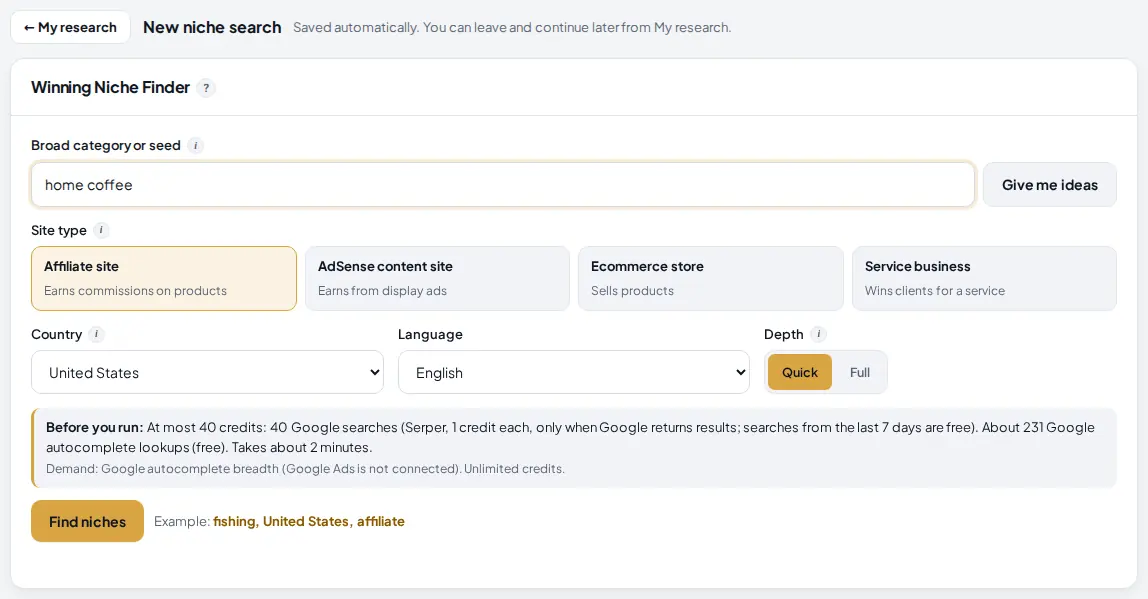
The finder opens with your topic filled in. Before you run it, set what kind of site you want, because that changes how money is judged.
 1
2
3
4
5
6
7
1
2
3
4
5
6
7
- Broad category or seed: the area to look inside.
- Give me ideas shows a list of broad starting points to click when you have none.
- Site type: AdSense weighs the RPM estimate and CPC; Affiliate and Ecommerce also count store pages and shopping results in Google; Service uses CPC most.
- Country: autocomplete, Google results and Google Ads data all come from here, and it sets the AdSense RPM tier.
- Depth: Quick finds up to 25 niches with 2 Google searches each (at most 40 credits); Full up to 40 niches with 3 each (at most 60).
- Before you run: the most it can cost, where demand comes from and how long it takes.
- Find niches starts the run.
3 Let it run
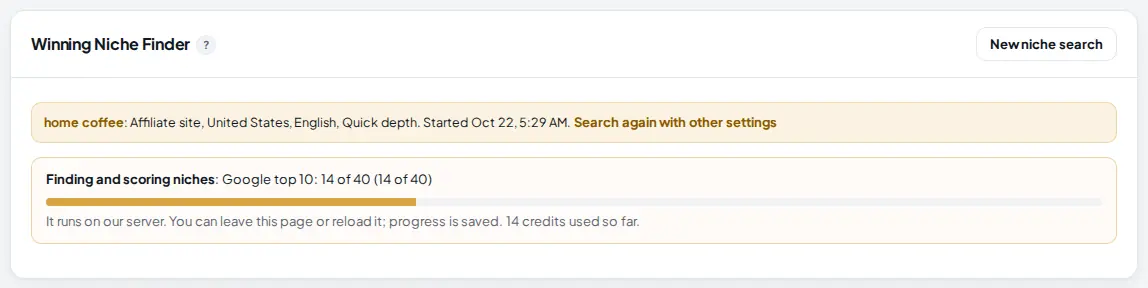
The run happens on our server in four parts: ideas (your AI and Google autocomplete suggest niches), demand, competition (the Google top 10 for 2 or 3 head keywords per niche) and the score. A progress bar shows where it is and how many credits were used.
 1
2
1
2
- What it is doing now, for example "Google top 10: 14 of 40".
- The progress bar. You can reload or leave; progress is saved, and if it stops it continues from where it was.
4 Read the summary and filter the list
When it finishes you see how many niches were scored and how, then a table with one row per niche, best score first. If the run reached its search cap, a box offers Check more to check the head keywords that are left.
 1
2
3
4
5
6
1
2
3
4
5
6
- Niches scored, and where the ideas came from.
- Demand source: Google Ads search volume, or Google autocomplete breadth when Google Ads is not connected.
- Score filter: 40, 55 or 70 or more. Next to it, a money level filter and a search box.
- Easy wins only keeps niches whose Google top 10 looks beatable.
- Export CSV downloads the whole list.
- Click any column header to sort by it.
The score is demand 30%, competition 35%, money 25% and trend 10%. Parts that were not checked are left out and the rest is scaled to 100, so a niche is never scored on a guess.
5 Read one niche row
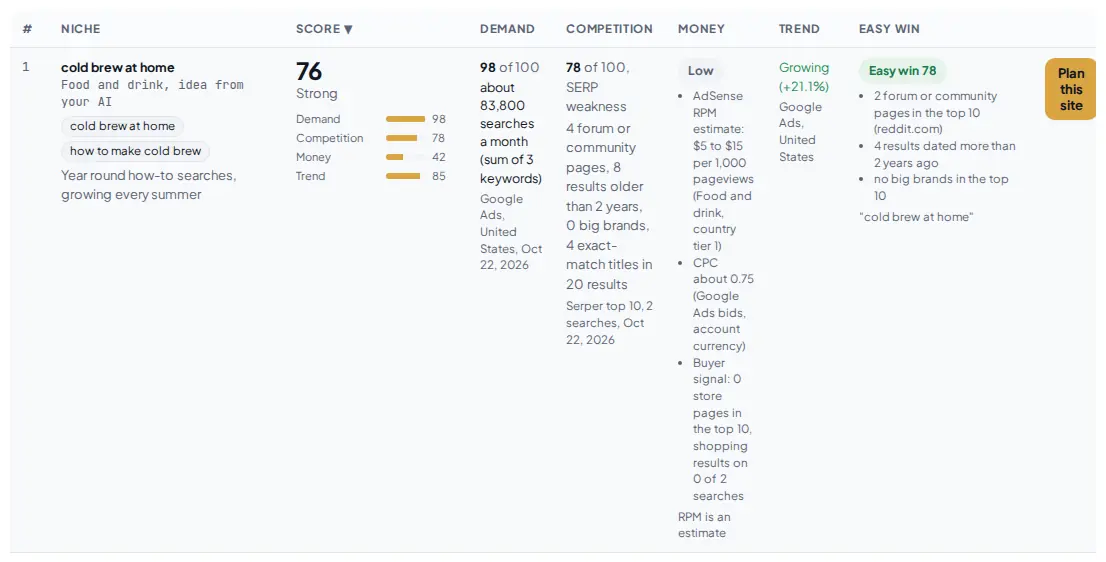
Every number in a row shows where it came from, so you can judge it yourself.
 1
2
3
4
5
6
7
1
2
3
4
5
6
7
- The niche, its category, where the idea came from, and its head keywords.
- Score with a verdict and a bar for each part.
- Demand: searches a month for the head keywords (Google Ads), or autocomplete breadth.
- Competition: how weak the Google top 10 is. Higher is easier: forums, old pages, few big brands and titles that do not match all add points.
- Money: High, Medium or Low, from CPC, an AdSense RPM estimate for the niche group and country, and store results. RPM is an estimate, labeled as such.
- Easy win: the best head keyword's top 10 rated 0 to 100, with its reasons.
- Plan this site starts a site plan for this niche.
6 Plan the site
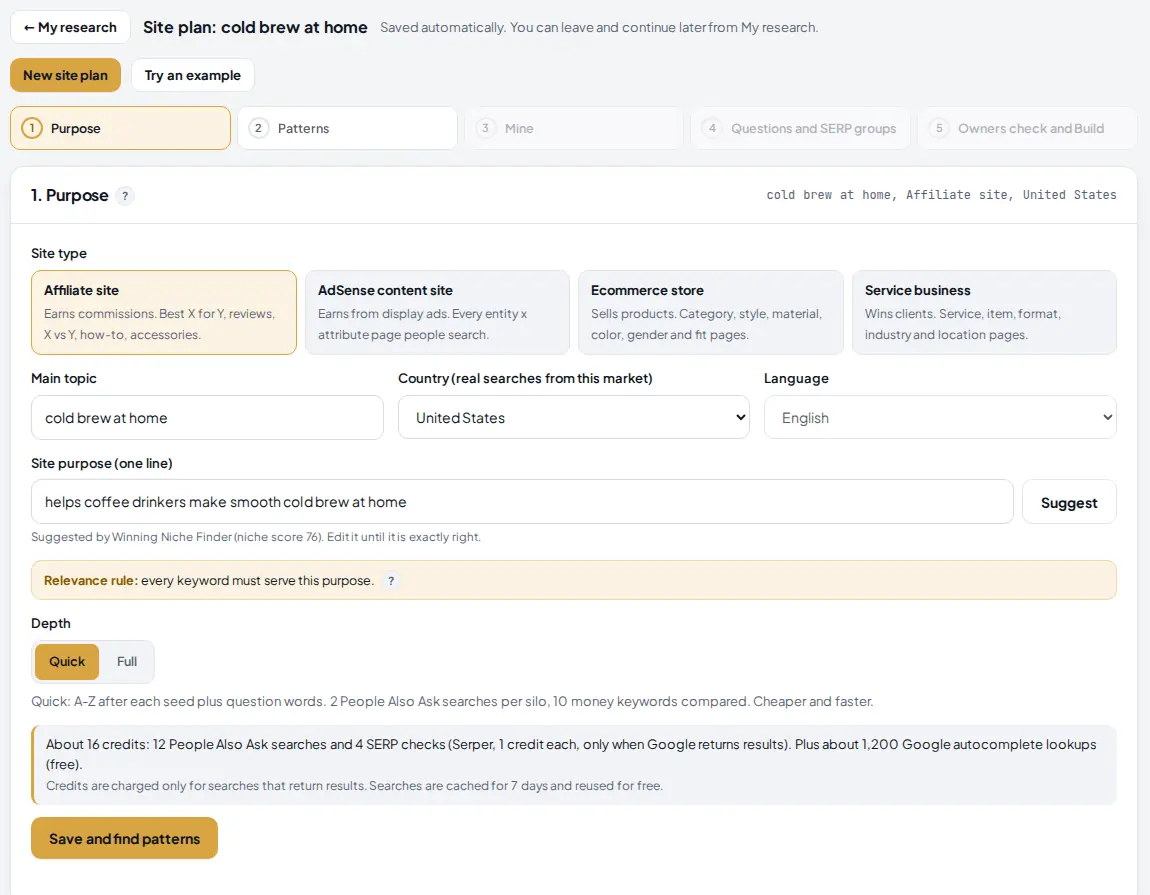
Press Plan this site on the niche you want. A new site plan opens at step 1 with the niche as the main topic, your site type and country, and a suggested purpose marked "Suggested by Winning Niche Finder" with the niche score.
 1
2
3
4
1
2
3
4
- My research takes you back. The niche search stays saved, and its row now says Open site plan.
- Main topic: the niche.
- Site purpose: suggested from the niche. Edit it until it says exactly who the site helps and with what.
- The note shows the purpose came from the Winning Niche Finder, with the niche score.
From here, follow Plan a whole site from real Google searches.
Tips
- Try two or three broad topics before you decide. The same rules score them, so you can compare niches across runs.
- Sort by Competition and look at the reasons: forums and old pages in the top 10 are the clearest sign a new site can rank.
- For AdSense, look at Money and the country tier; the same niche earns very differently in the US and in tier 3 countries.
- A growing trend with a beatable top 10 is worth more than a big niche full of big brands.
- Export CSV and keep it with your notes when you plan several sites.
Common mistakes
- Picking the biggest demand only. Big demand often comes with big brands in the top 10. Read Competition and Easy win before you decide.
- Treating RPM as earnings. It is an estimate by niche group and country from public publisher surveys. Your real RPM depends on traffic, layout and season.
- A seed that is too narrow. The finder looks for niches inside your seed. "home coffee" gives many ideas; "cold brew ratio" gives few.
- Ignoring the cap. When a run hits its search cap, some niches are scored without competition. Press Check more to finish them.
What to do next
Plan the niche you picked with Niche Research, then see what is trending in it with the Viral Finder. More on the Winning Niche Finder page.
Frequently asked questions
What does a niche search cost?
Autocomplete is free. Each Google search for competition costs 1 credit, only when Google returns results, and searches from the last 7 days are free. Quick uses at most 40 credits and Full at most 60. A run never uses more credits than you have left.
Do I need an AI key?
No, but it helps. With your AI key, ideas come from your AI and Google autocomplete, and each niche gets a suggested purpose. Without one, ideas come from autocomplete only.
How is the score worked out?
Score = demand 30% + competition (how weak the Google top 10 is) 35% + money 25% + trend 10%. Parts that were not checked are left out and the rest is scaled to 100. Every part shows its source in the row.
Why does trend say not checked?
Trends and search volume come from Google Ads, which the admin connects in Admin > Platform keys. Without it, demand uses Google autocomplete breadth and trend is left out of the score.

Founder of AM Jarvis. More than a decade running e-commerce stores, Google Shopping campaigns and niche sites. About the author
The app changes often. If a screen here no longer matches what you see, let us know and we will update the guide.