Quick answer
The keyword score tells you how hard an Etsy keyword is from real listings, favorites and shop sales, and how much demand it has from Google, with related phrases that have less competition. The tag optimizer then scores each of your 13 tags against the tags of the listings that rank now and suggests swaps.
This guide is for Etsy sellers who want to pick keywords that a new or small shop can rank for, and fill all 13 tags with phrases buyers really use. Both tools are in Marketplace Research, on the Etsy tab.
Each run uses 1 research run and no credits (Free has 5 a month, Starter 100, Pro and Agency no monthly cap). Etsy data needs the Etsy API key, which the admin adds once in Admin > Platform settings. Etsy does not publish search volume, so demand comes from Google and is always labeled: from Google Ads when the admin connected it, otherwise from Google autocomplete.
1 Score a keyword
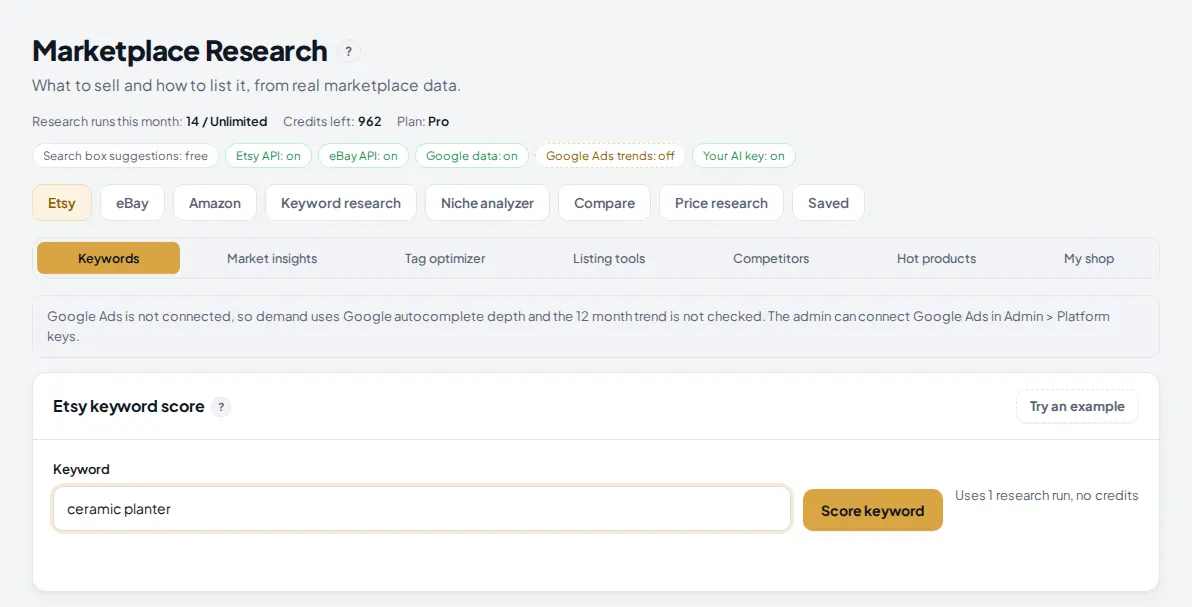
Open Marketplace Research, stay on the Etsy tab and pick Keywords. Type one keyword the way a buyer would, for example ceramic planter, and press Score keyword.
 1
2
3
4
5
1
2
3
4
5
- The Etsy tab.
- Keywords is the keyword score tool. The other sub tabs are Market insights, Tag optimizer, Listing tools, Competitors, Hot products and My shop.
- This note appears when Google Ads is not connected: demand then comes from Google autocomplete and the 12 month trend is not checked.
- Keyword: one phrase, up to 60 characters.
- Score keyword: 1 research run, no credits.
2 Read the score
The result opens with five numbers. The keyword score is what you compare between keywords: 60 or more is good, 40 to 59 is fair.
 1
2
3
4
5
1
2
3
4
5
- Keyword score: 60% demand plus 40% ease (100 minus difficulty).
- Difficulty from real Etsy numbers: active listings, favorites of the top 20 listings and lifetime sales of the shops behind the top 10. Under 40 is easy, 65 or more is hard.
- Demand from Google, 0 to 100. With Google Ads it is real monthly Google searches; without it, how many longer phrases Google suggests for "etsy" plus your keyword. The line under it says which.
- 12 month trend: growing, stable or declining from Google Ads. "Not checked" means Google Ads is not connected.
- Check my tags for this keyword opens the tag optimizer with this keyword filled in. Market insights reads the top 100 listings for it.
3 Find related keywords with less competition
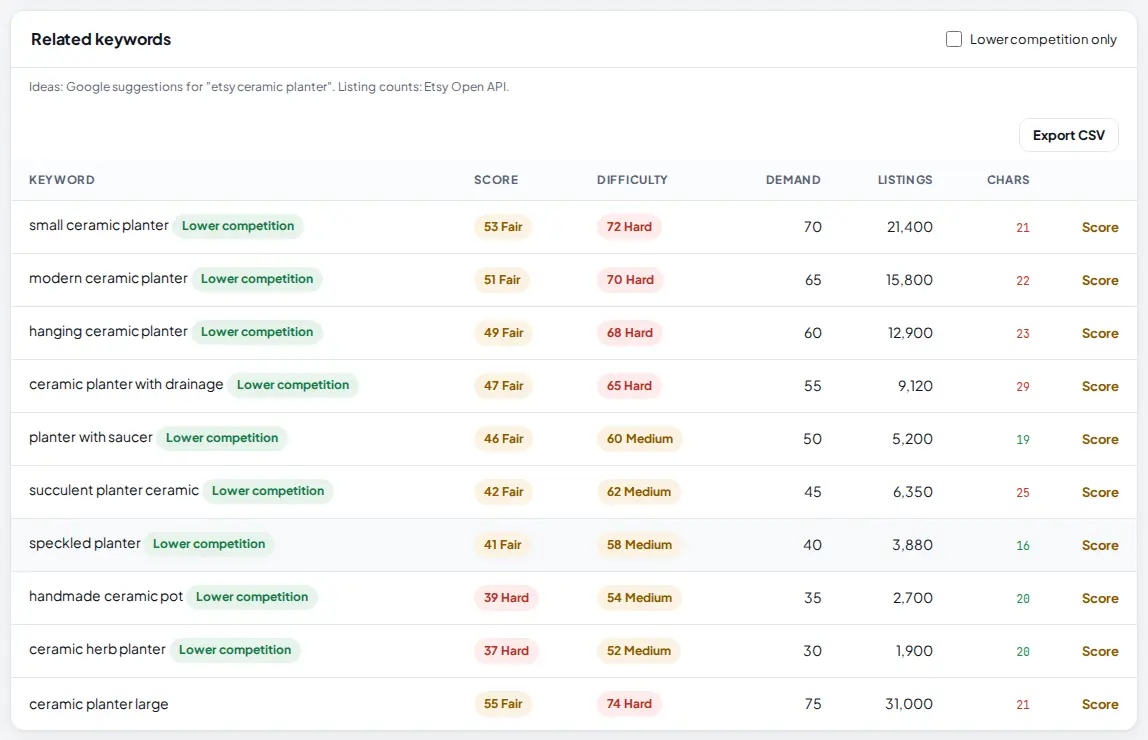
Under the score, the related keywords table lists phrases from Google suggestions for "etsy" plus your keyword, each with its own score, difficulty, demand and number of Etsy listings. Phrases marked Lower competition have at most half as many listings as your keyword, or a difficulty under 45.
 1
2
3
4
5
1
2
3
4
5
- Lower competition: a phrase worth a closer look.
- Difficulty for the phrase, from its listing count and the favorites of its top 10 listings.
- Chars: the length of the phrase. Etsy tags allow 20 characters, so red numbers are too long to use as a tag.
- Lower competition only hides the rest.
- Score runs the full keyword score for that phrase (1 research run).
Tip: Copy related as tags (above the table) copies every related phrase that fits in 20 characters, separated by commas, ready to paste into your tags.
4 See what makes the keyword hard
Open How the scores work to read the exact formulas. The table under it breaks difficulty into its three parts, so you can see whether it is hard because of the number of listings, the favorites of the top listings or the size of the shops behind them.
 1
2
1
2
- How the scores work shows every formula in plain words.
- What makes it hard: each part with its real value, its 0 to 100 scale and its weight.
Further down you see the top listings for the keyword (price, favorites, views and age) and the shops behind them with their lifetime sales. Big, old shops at the top mean a new shop will find it harder. Every table has its own Export CSV button.
5 Check your tags against the listings that rank
Click Tag optimizer (or Check my tags for this keyword from the score). Paste a link to your Etsy listing, or type its title and tags, separated by commas. Add the target keyword the listing should rank for, and press Score my tags.
 1
2
3
4
5
6
1
2
3
4
5
6
- Tag optimizer sub tab.
- Etsy listing link or ID: any active listing, yours or a competitor's. With a link, Jarvis reads the title and tags itself.
- Target keyword: the search you want the listing to rank for.
- Title: only needed when you do not paste a link.
- Tags: up to 13, separated by commas.
- Score my tags: 1 research run, no credits.
6 Read your tag score
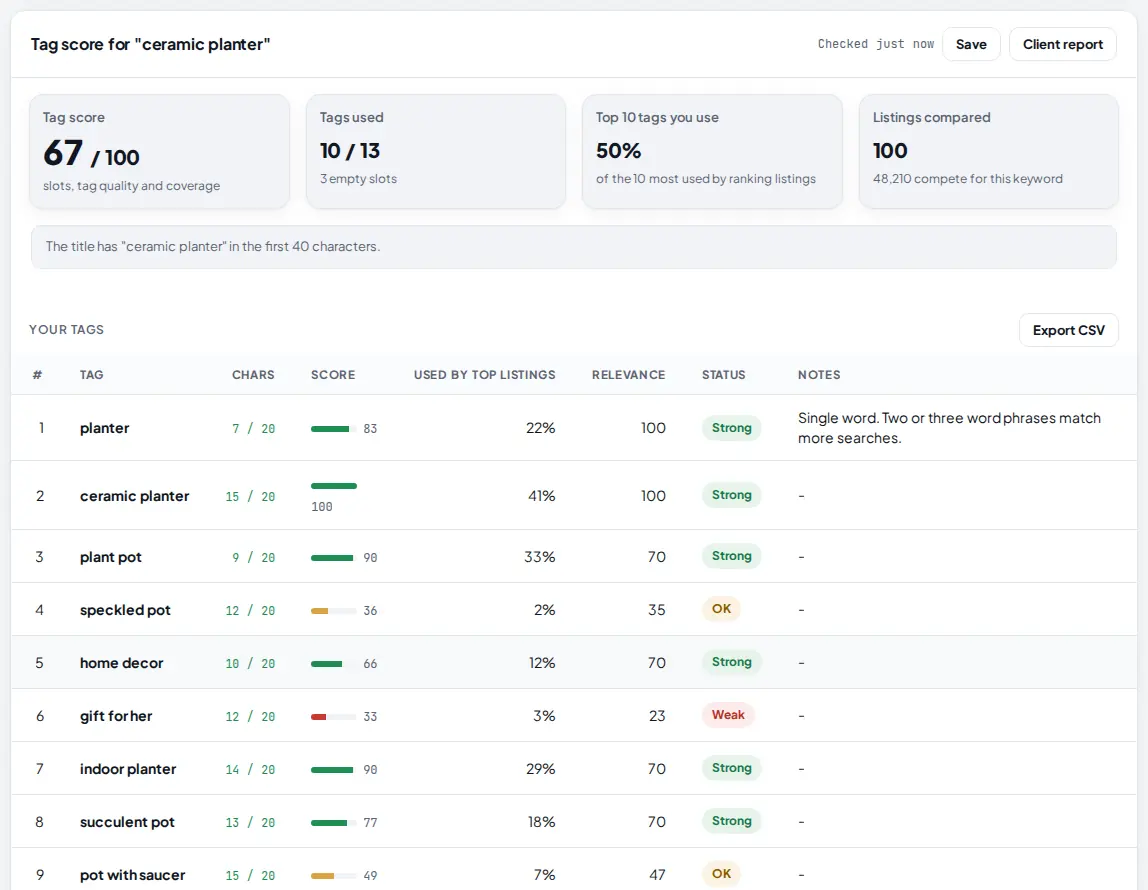
Jarvis reads the tags and titles of the top 100 active listings for your keyword and scores each of your tags against them. The total is out of 100.
 1
2
3
4
5
1
2
3
4
5
- Tag score: 30% slots used, 50% the average tag score and 20% how many of the 10 most used tags you already have.
- Top 10 tags you use: out of the 10 tags the ranking listings use most.
- Title check: whether your keyword is in the first 40 characters of the title.
- Status: Strong (60 or more), OK (35 to 59) or Weak. Weak tags are the ones to replace.
- Notes explain problems, such as a single word tag, a duplicate, a tag over 20 characters, or a tag no ranking listing uses.
7 Use the suggested 13 tags and swaps
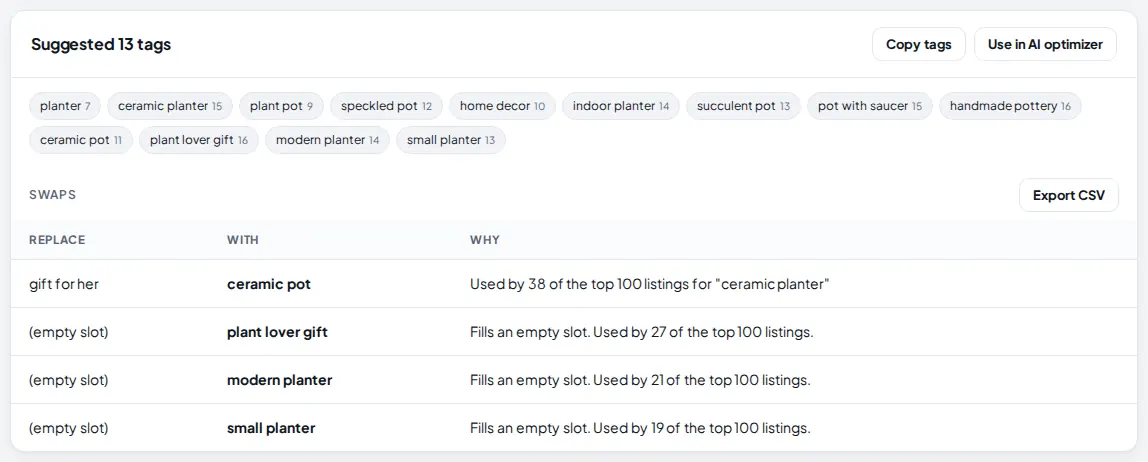
The next card gives you a full set of 13 tags: your Strong and OK tags, plus the most used tags from ranking listings for your weak tags and empty slots. The swaps table says exactly which tag to replace with what, and why.
 1
2
3
4
1
2
3
4
- Suggested 13 tags, each with its length.
- Copy tags copies all 13, comma separated, ready to paste into Etsy.
- Swaps: the tag to replace (or an empty slot) and the tag to use instead.
- Use in AI optimizer sends the listing to the AI optimizer in Listing tools, which rewrites the title and tags with your AI key. With a connected shop you also get Send to my shop editor, which shows a before and after preview first.
 1
1
- Missing tags: tags used by at least 4% of the ranking listings that are not in your list.
Tips
- Score three or four keyword ideas before you pick one. Compare their keyword scores, not their demand alone.
- Use long, specific phrases from the related list as tags. They match buyers who know what they want.
- Fill all 13 tag slots. An empty slot is a search you cannot be found for.
- Run the tag optimizer on a competitor that ranks well for your keyword to see which tags it uses.
- Keep your main keyword in the first 40 characters of your title; the tag optimizer checks this for you.
Common mistakes
- Reading demand as Etsy search volume. Etsy does not publish it. Demand is a Google signal and is labeled with its source. Use it to compare keywords, not as a number of buyers.
- Using tags over 20 characters. Etsy will not accept them. Watch the Chars column; red means too long.
- Single word tags. Two or three word phrases match more real searches. The notes column flags single words.
- Copying every missing tag. Only use tags that describe your item. A popular tag that does not fit brings views that do not buy.
What to do next
For a deeper look at a keyword, use Market insights on the same tab. For everything Etsy in AM Jarvis, see Etsy Research. Selling on eBay too? Read the eBay title builder guide.
Frequently asked questions
Does AM Jarvis show Etsy search volume?
No, because Etsy does not publish it. Difficulty uses real Etsy numbers (listings, favorites, shop sales). Demand comes from Google: monthly searches from Google Ads when the admin connected it, otherwise how many longer phrases Google suggests. The source is written under the number.
Why does the trend say "not checked"?
The 12 month trend comes from Google Ads. Until the admin connects Google Ads in Admin > Platform keys, the trend is not checked and demand uses Google autocomplete.
Can I check a competitor's tags?
Yes. Paste the link to any active Etsy listing in the tag optimizer. Jarvis reads its title and tags and scores them against your target keyword.
Will it change my Etsy listing?
Not by itself. You copy the tags and paste them on Etsy. If you connected your shop in My shop, Send to my shop editor shows a before and after preview, and nothing changes until you press Apply to Etsy.
What does it cost?
Each keyword score and each tag check uses 1 research run and no credits.

Founder of AM Jarvis. More than a decade running e-commerce stores, Google Shopping campaigns and niche sites. About the author
The app changes often. If a screen here no longer matches what you see, let us know and we will update the guide.