Quick answer
You type your product and Jarvis reads the best matching eBay listings, scores every word by how much the titles that contain it sell, and shows the best selling titles. You click words into an 80 character title and copy it, or let your AI write three options with item specifics.
eBay gives you 80 characters for a title, and buyers search with the words in it. The words that matter are the ones in listings that already sell, not the ones a generic tool guesses. The title builder reads those listings and ranks their words for you.
You need: any plan. Scoring words uses 1 research run and no credits, and needs eBay data (the eBay App ID and Cert ID the admin adds once). The AI title options part uses your own AI key from Settings and 1 research run; it still works when eBay data is off.
1 Open the title builder
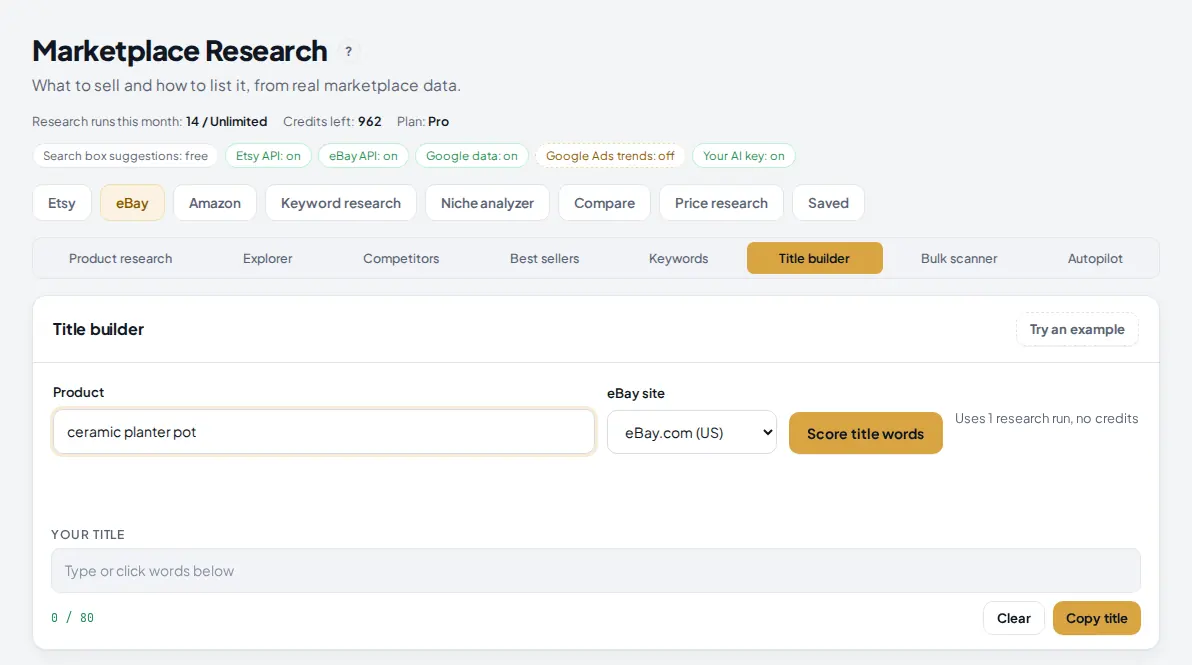
Go to Marketplace Research, click the eBay tab, then Title builder. Type your product the way a buyer would search it, for example ceramic planter pot, and pick the eBay site you sell on.
 1
2
3
4
1
2
3
4
- Title builder in the eBay sub tabs.
- Product: two to five words, like a buyer's search.
- eBay site: the words differ between eBay.com, eBay.co.uk, eBay.de, eBay.com.au and eBay.ca.
- Score title words runs it. 1 research run, no credits.
Tip: Coming from Product research? The button Build a title from these on a research result opens this page with your product already filled in.
2 Click words into your title
After a few seconds you get up to 40 words taken from the 30 best matching listings. Each word has a score from 1 to 100. A word scores higher when the titles that contain it sold more units; the top word is 100. Words that appear in only one title are left out when there are enough titles to compare, because they are usually a model number or a one-off.
Type the start of your title yourself, then click words to add them. A word turns green once it is in your title, and the counter shows how many of the 80 characters you used.
 1
2
3
4
5
1
2
3
4
5
- Your title: type in it freely, or click words below to add them at the end.
- The counter: characters used out of 80. It turns red past 80.
- Word chips with their score. Hover a chip to see in how many titles it appears and how many of those sold.
- A grey chip is not in your title yet. If adding it would go over 80 characters, Jarvis tells you and does not add it.
- Copy title copies it to your clipboard. Clear empties the box.
Tip: Clicked words are added in lower case. Fix the capitals before you copy if you want a tidy title; eBay search does not care about case.
3 Learn from the best selling titles
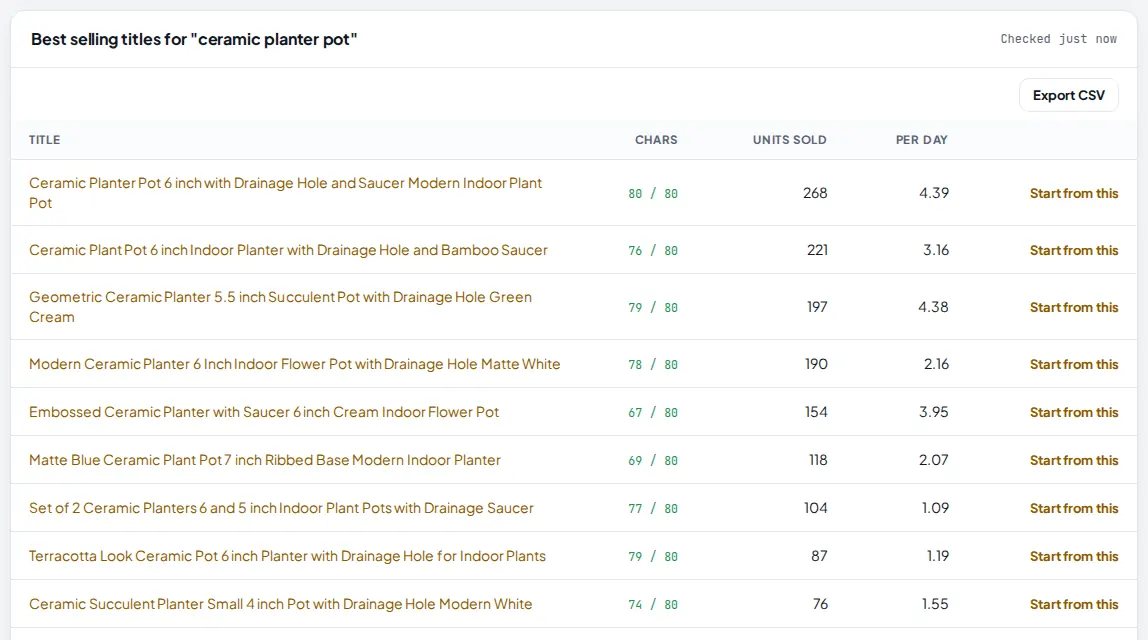
Under the builder, Jarvis lists up to 10 titles from the checked listings, sorted by units sold, with their length and sales a day. This is the quickest way to see how sellers who already sell structure their titles.
 1
2
3
1
2
3
- Units sold on that listing, from eBay's own sold count.
- Chars: how many of the 80 characters the title uses. Most best sellers use almost all of them.
- Start from this copies that title into your box (cut to 80 characters) so you can edit it into your own.
Use these as a pattern, not as something to copy word for word. Your title should describe your item exactly: size, material, color and what is included.
4 Get AI title options and item specifics
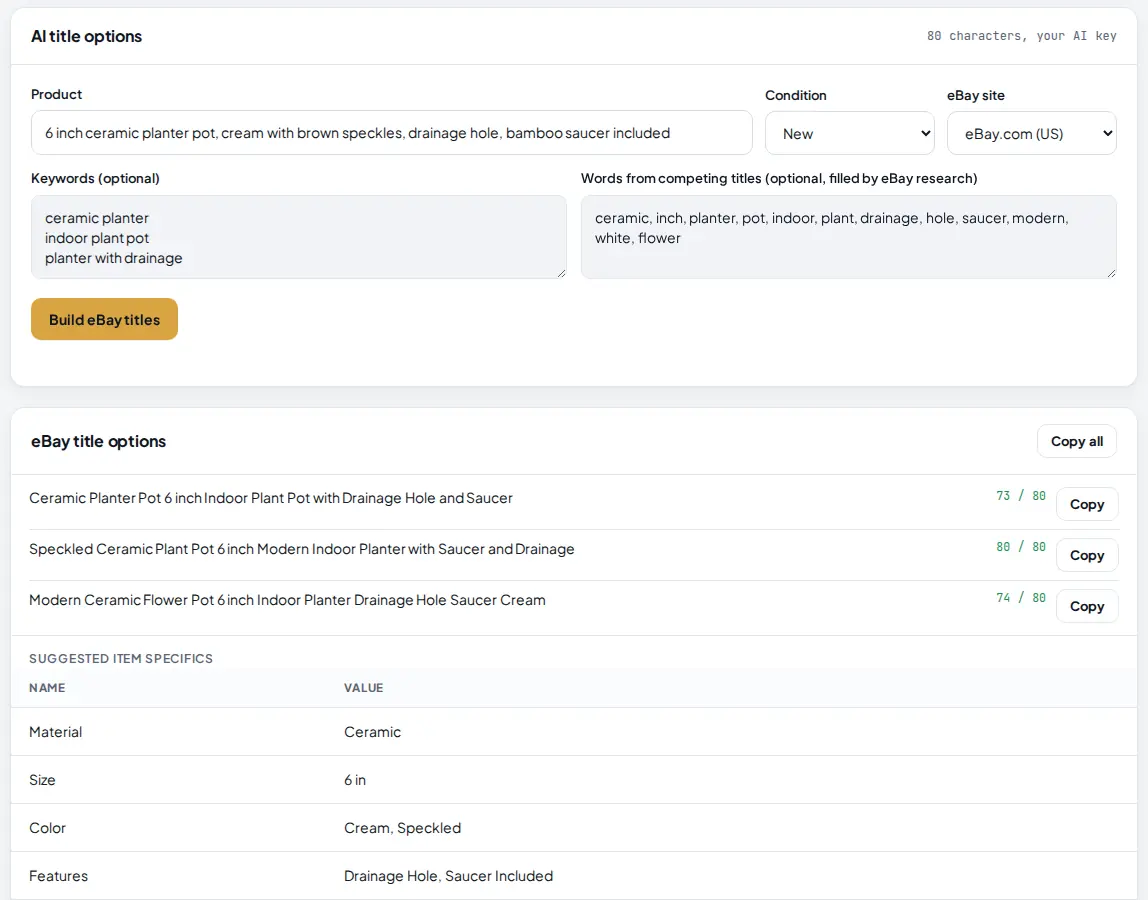
Further down, the AI title options card writes three titles with your AI key. Describe the product in plain words, pick the condition and the eBay site, and add keywords you want in the title, one per line. The words from competing titles box can hold the top words from your title builder run.
 1
2
3
4
5
1
2
3
4
5
- Product: what it is, size, color, material and what is included. The AI only uses what you write here.
- Words from competing titles: paste the top words from the builder, so the AI uses the words that sell.
- Build eBay titles writes three options. Your AI key, 1 research run.
- Each title shows its length out of 80, and has its own Copy button. Copy all copies all three.
- Suggested item specifics: up to 8 name and value pairs to fill in on eBay, such as Material, Size and Color. The AI is told never to invent a brand or model.
The AI follows eBay's title rules: at most 80 characters, no promotional words like "wow" or "free shipping", no emoji, no all caps words and no repeated words. Read each title once before you use it.
5 Copy your title into eBay
When the title reads well and the counter is at or under 80, press Copy title and paste it into the title field of your eBay listing. Fill in the item specifics too: eBay uses them in search filters, and buyers often filter by size and color.
If you sell the same product on more than one eBay site, run the builder again with the other site selected. The best words in the UK or Germany are often different.
 1
1
- Build a title from these on a Product research result opens the title builder with the same product and site.
Tips
- Put the words buyers search first: the product type and its key detail ("Ceramic Planter Pot 6 inch") before nice-to-have words.
- Use high scoring words that are true for your item. A word that sells for others but does not describe your product brings the wrong buyers and returns.
- Use most of the 80 characters. The best selling titles in the list usually do.
- Run the builder again every few months. The words that sell change with seasons and trends.
Common mistakes
- Adding every high scoring word. A title stuffed with words reads badly in search results. Pick the words that describe your item and leave the rest.
- Copying a best seller word for word. Use it as a pattern. A copied title can describe a slightly different item, and buyers notice.
- Skipping the item specifics. Buyers filter by them. The AI gives you a starting set; check every value against your product.
- Ignoring the eBay site. Words that sell on eBay.com may not be the ones British or German buyers type. Pick the right site before you score.
What to do next
Find products worth a title with the eBay Product Explorer. Everything in the eBay tab is described on eBay Product Research.
Frequently asked questions
How is the word score worked out?
Jarvis reads the 30 best matching eBay listings and their sold counts. For each title that contains a word, it adds 1 plus the natural log of 1 plus that listing's units sold. The highest word becomes 100 and the rest are scaled to it, so words from titles that sell more rank higher.
Why are clicked words added in lower case?
Words are collected from many titles and stored in lower case so the same word is counted once. Fix the capitals in the box before you copy, if you like. eBay search is not case sensitive.
Do I need an AI key?
Only for the AI title options. Scoring words, the best selling titles and the click-to-build title work without one. Add an AI key in Settings to use the AI part.
What does it cost?
Scoring words uses 1 research run and no credits. Each AI title run also uses 1 research run and runs on your own AI key. Free has 5 research runs a month, Starter 100, Pro and Agency no monthly cap.

Founder of AM Jarvis. More than a decade running e-commerce stores, Google Shopping campaigns and niche sites. About the author
The app changes often. If a screen here no longer matches what you see, let us know and we will update the guide.